
Coverage maps and tower maps answer different questions
A tower map shows the locations of towers in its dataset. A coverage map represents service across an area. Seeing a nearby tower does not tell you exactly what reception you will have inside a building, and an area of coverage does not identify your phone’s serving tower.
In Open Signal, the Map and Coverage tabs give these two views their own space. Use the tower map to explore individual locations and the coverage layer to look at a larger area.
Where this layer works: the Open Signal coverage view shown on this page covers the United States and Canada. The screenshot shows New York. Tower results in other locations do not imply that the same coverage layer is available worldwide.
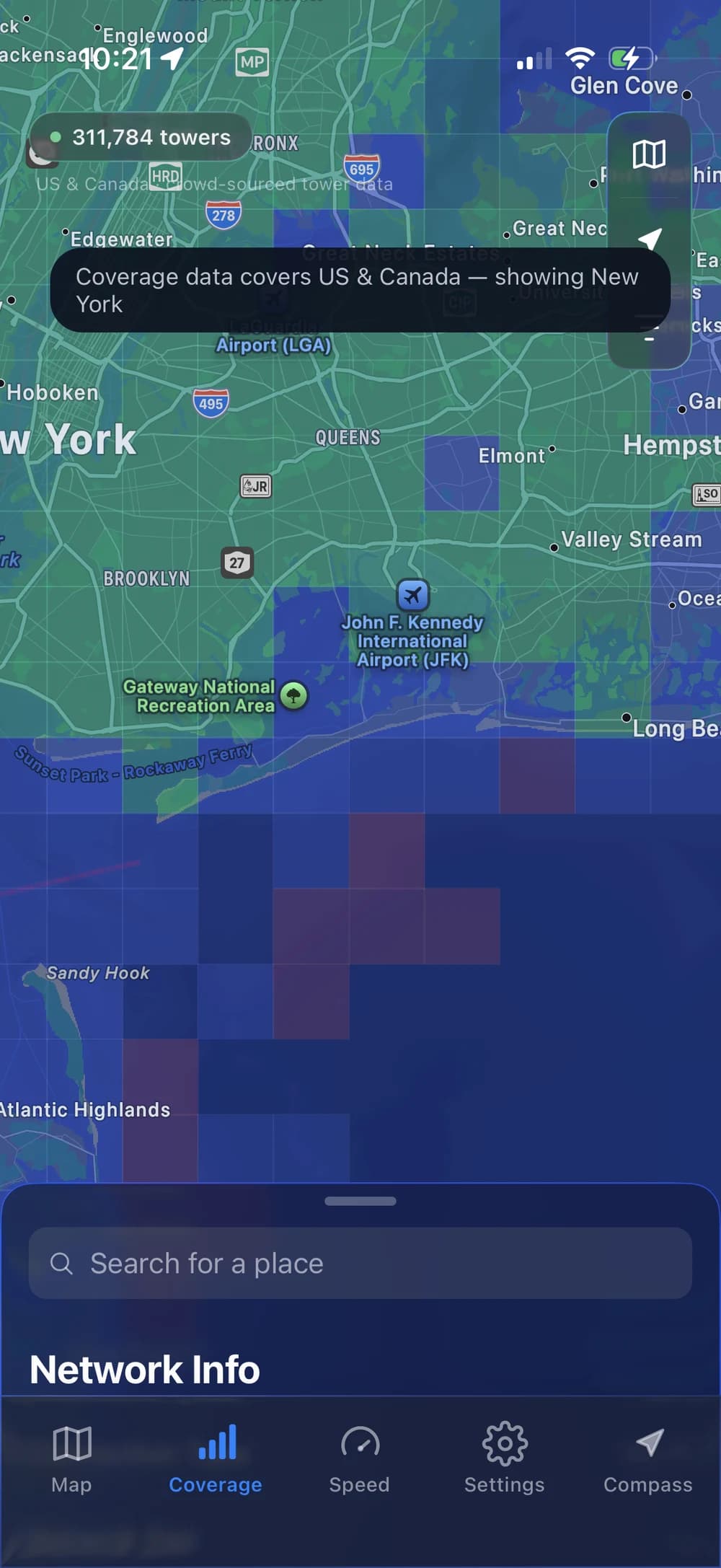
Check a place in four steps
- Open the Coverage tab. Start with the area you want to understand, such as a neighborhood, destination, or work location.
- Look at the area around the address. Zoom out to see the wider pattern, then zoom in for local context. Follow the active layer’s labels and legend; colors do not have a universal meaning across apps.
- Cross-check your carrier. Open the current official coverage map for your own provider and look up the same address.
- Check the connection on arrival. Try the calls, uploads, or video meetings that matter to you. A colored area alone cannot establish that they will work well.
Keep a note of the carrier, device, location, and time when comparing results. Changing several of those at once makes it harder to understand why the experience changed.
A colored area is not a reception guarantee
Coverage information is useful for planning, but it has limits. Verizon describes its map as approximate outdoor coverage, with actual service subject to variation. Indoor performance needs its own check.
For a new home, test where you spend time: the desk, kitchen, and other rooms you use regularly. For travel, consider the route as well as the destination. For remote work, upload performance and a stable connection can matter as much as headline download speed.
Do not interpret a visible map boundary as a precise line where service starts or stops. The range circle around a single tower should be treated with the same care.
Useful maps to check alongside the app
For US carrier information, start with the official maps from Verizon, AT&T, and T-Mobile. Check the provider, network type, and device conditions that apply to your service. If you use a different operator, use that operator’s current coverage information.
For another perspective, Opensignal by Opensignal Limited offers coverage and connection-testing tools. It is a separate product from Tesera Studio’s Open Signal. Our app comparison explains the different uses.
A practical workflow is simple: explore in Open Signal, compare the official carrier information, then test the real connection at the location you care about.
Product details and sources checked September 17, 2026. Written by the developer of Open Signal; external products belong to their respective developers.